SteerClear Road Test Practice: GPS-tracked practice for learner drivers
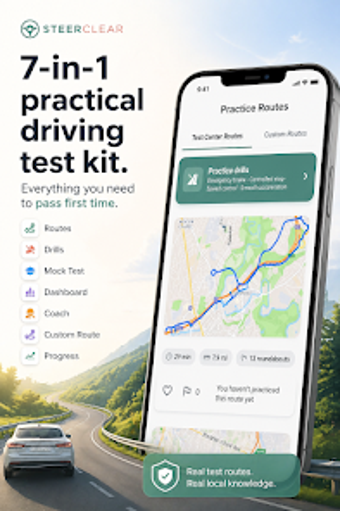
SteerClear Road Test Practice from steerclear is an Android app designed to help learner drivers prepare for DMV road tests. The app records supervised drives and presents a maneuvers checklist to structure practice, combining session tracking with performance feedback during each drive. Key functions include automated logging of supervised hours, progress monitoring, and a practice curriculum covering parallel parking and three-point turns. It suits teenagers with learner permits and adult students needing an organized record of driving practice.
What the tool actually does during supervised practice
The app acts as a digital companion for supervised driving by recording routes and session length via device GPS and presenting an exam-oriented checklist. That checklist focuses on examiner-graded tasks, listing items such as parallel parking, three-point turns, lane changes, and intersection safety. In classroom or home settings the tool converts routine drives into structured practice runs that target specific on-road competencies.
How practice sessions support skill development
The practice workflow groups drives into repeatable sessions and supplies post-drive performance feedback that highlights where a learner needs more work. A structured curriculum helps ensure instructors and learners do not omit critical maneuvers, while session summaries help prioritise subsequent coaching. For self-directed learners the feedback helps set measurable goals, and for supervising adults it clarifies which skills to reinforce in the next in-car lesson.
Who can use it and what device access it requires
The target audience is clear: student drivers, teenagers with learner permits, and adults preparing for the practical exam. Use depends on having an Android device with functional GPS, so device capability affects availability. Supervision remains necessary because the tool records practice but does not replace an instructor. Users should verify whether a digital driving log meets their local licensing authority's acceptance rules.
How it records progress and how learners adopt it
Automated logging of supervised hours helps assemble documentation requested by many licensing systems, and progress monitoring records the variety and frequency of driving situations encountered. Some features require an internet connection to sync or share records. User feedback reports the app helps organise practice sessions and maintain an accurate driving log, which encourages learners who prioritise orderly, evidence-based training records.
A practical choice for organised learner drivers
Given the developer's focus on driver education and generally positive user reception, this tool suits learners who prefer structured practice and documented session records. Expect to use it alongside supervised in-car coaching and confirm local licensing rules before relying on digital records. Practical tip: set a weekly session target and export logs regularly so records are ready for review or licensing submission.
Pros
GPS-based session tracking records routes and durations
Automated logging of supervised hours simplifies documentation
Structured practice curriculum ensures critical maneuvers are covered
Performance feedback highlights weaknesses before the exam
Cons
Requires an Android device with functional GPS
Some features and syncing require internet access
Digital driving logs may not be accepted by every state
Laws concerning the use of this software vary from country to country. We do not encourage or condone the use of this program if it is in violation of these laws. Softonic may receive a referral fee if you click or buy any of the products featured here.